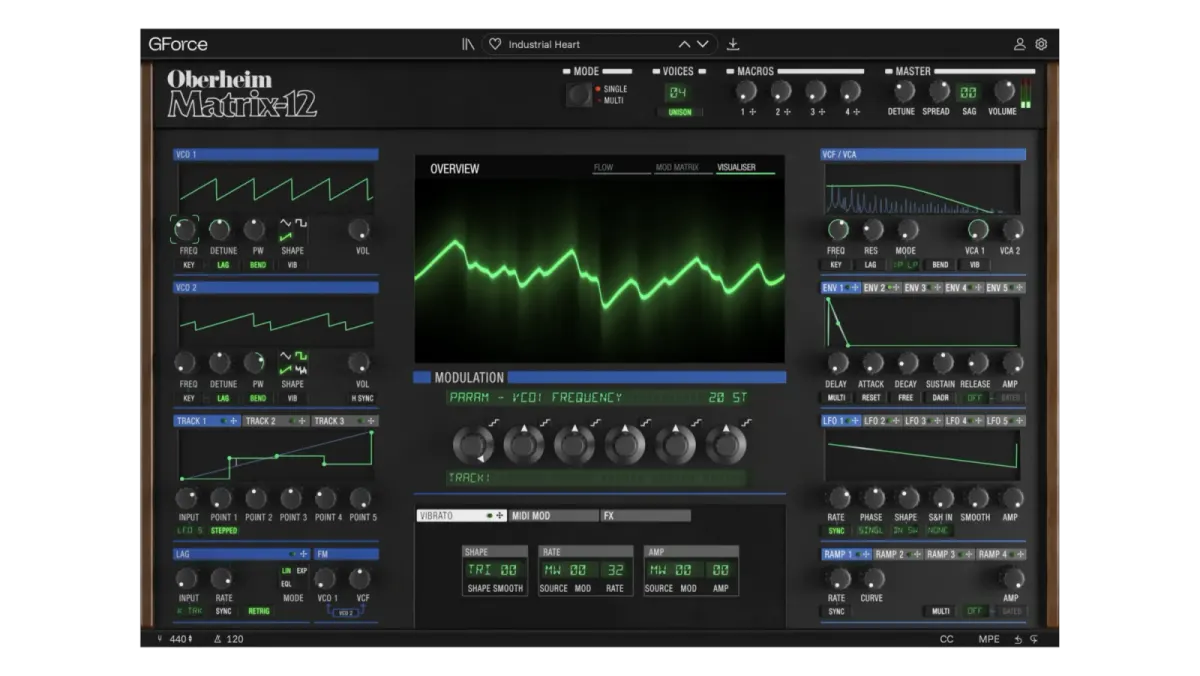
Want a pad that slowly changes character, or different sounds across the keyboard? Oberheim Matrix-12 lets you design those parts by combining modulation and individual voices. GForce Software released this officially licensed instrument on November 5, 2026, working with Oberheim and original designer Marcus Ryle.
See what is moving the sound
Each voice has two VCOs, a 15-mode filter, five envelopes and five LFOs. Drag a modulation source onto a knob to connect it, with six modulation slots available per parameter.
Flow shows the signal path, Mod Matrix gathers the connections into a grid, and Visualiser displays the sound. You can build a pad with a long envelope changing its brightness and an LFO adding movement while keeping the routing in view.
One instrument or several layers
Single mode uses the 12 voices as one instrument. Multi mode gives individual voices their own sounds, with up to six overlapping keyboard zones, separate MIDI channels and micro arpeggiators. MPE, four macros, delay and reverb add performance and sound-shaping options.
Register and install
Register the purchase to a GForce account, then download and install it with GForce Installer. Start with the official installer guide. Play the standalone version or load VST2, VST3 or AAX in a compatible DAW; AU is available on Mac.
The current manufacturer requirements are macOS 10.15 or later, or Windows 8 or later, with 8 GB RAM. The Windows CPU recommendation is an Intel i5/Ryzen 5 equivalent. Downloads require internet access.